An Exploration of the Dynamics of Abstract Art
By Kevin Goodier [feedback@biggreenball.com]
Master’s Project for the M.S. in computer science degree
Advisor: Dr. Cindy Grimm [cmg@cs.wustl.edu]
Publicly presented at the Interactive Technology Installation Art Show
May 4, 2001
Abstract
This project explores the dynamics of abstract art in a publicly accessible format. It presents a simple, easy-to-understand interface that allows the user to create and manipulate geometric, temporal, and visual properties of shapes overlaying a traditional still-life painting. The user needs no special computer skills or knowledge to use the program. In a matter of minutes he or she will be creating complex, dynamic animations and images. Development of this project was done from the ground-up using C++, OpenGL[1], and GLUT[2].
Purpose
From a technical perspective, this project is a wonderful opportunity to explore creative, non-traditional user interfaces. It also involves the creation of a general-purpose graphics and physics engine from the ground up, which could easily be adapted to a number of other uses. To some extent, this project is an exercise in well-polished, bug-free software development, due to the public nature of the installation.
This project has been implemented using a cross-platform 3D graphics library. The underlying technology is completely invisible to the user. The technical issues to be explored are:
- How to make a simple, concise, easily understood interface that still allows the user autonomous control?
- Should a project such as this use custom 2D graphics or a publicly-available 3D library in a 2D fasion?
- How to create smooth, fast, interesting animations in a 3D environment using 2D shapes?
- What is the most appropriate input device – mouse, graphics tablet, keyboard, camera, or some combination?
From an artistic perspective, this project poses a number of questions and leaves the answers up to the individual users. When viewed in its appropriate setting, as illustrated below, this project is first and foremost an interactive art installation that attempts to blur the line between artist and audience. The technology is merely the enabler.
 The
core idea of the project is to decompose a traditional painting, such as a
still life, into its core components: color, shape, line, form. On top of this has been added geometry and
temporal elements (animation). The user
manipulates the abstract representation of the original painting by creating
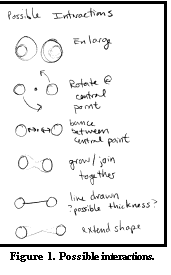
shapes and making connections between these shapes. A list of these ideas is shown in Figure 1. Some of the artistic issues to be explored
are:
The
core idea of the project is to decompose a traditional painting, such as a
still life, into its core components: color, shape, line, form. On top of this has been added geometry and
temporal elements (animation). The user
manipulates the abstract representation of the original painting by creating
shapes and making connections between these shapes. A list of these ideas is shown in Figure 1. Some of the artistic issues to be explored
are:
· Which geometric shapes are effective in abstract art? Why choose a circle over a square?
· How should the relationship of colors in abstract art relate, if at all, to reality?
· Does the aspect of motion and animation, as enabled by technology and computers, significantly change our perception of abstract art?
· When allowing the user to manipulate these properties, to what degree should control and artistic freedom be relinquished to the user? What is the most effective balance between potential chaos and controlled creation?
The Setting
This project is intended as an interactive art installation for public display. I envision this as an exhibit in a place such as the Mallinckrodt student center, the SIGGRAPH Emerging Technologies exhibition, or a local art gallery. The display will be projected onto the wall, which is framed in a very large wooden or metallic structure. The original still-life painting is hanging next to the projected image. The user stands back 10-15 feet. At this position, there is a small raised platform. It holds a podium with a graphics tablet and pen attached for the user input. To the side are a series of industrial throw switches that control aspects of the program such as current drawing shape and type of manipulation. A large red button resets the display. The computer and projector are concealed with drop cloths.
I believe the setting, atmosphere, and presentation account for a large part of the user’s experience. Unfortunately, the presentation of this project will not include the above setting.
Implementation
OpenGL and GLUT were chosen due to their wide availability, good performance, and (relative) ease of use. Even though this project uses 2D graphics, OpenGL makes it easy to perform affine transformations to the geometric shapes. C++ was chosen as the implementation language due to its versatility and performance.
The shapes are implemented as a linked series of faces, edges, and vertices. This makes interaction between the shapes straightforward. Vertices implement a realistic physics model that enables animation of position, rotation, scale, and color. For a given vertex, these properties animate between waypoints, which are simply other vertices. This allows complex looping animation sequences. Waypoints can be set and removed at any time.
The underlying still life painting is fixed and pre-divided into regions. These regions indicate logical boundaries and are used to control the color of the shapes. The colors and region mappings are specified in a simple text file and can be changed between executions. The image is texture-mapped onto a large quad face. The fixed camera is located directly above this face to give the illusion of a 2D environment.
Results
Both technical and artistic results and issues are discussed below.
Technical Results
The
performance of the system is highly dependent on the computer’s hardware – in
particular, the 3D ability of the video card.
The project is efficient enough relative to this bottleneck that no
other performance problems were issues.
I’m pleased with the underlying graphics and physics engine and feel it
will be useful in other applications.
I’ve been
asked the question “Isn’t C++ overkill for this project? Why not use [Shockwave, Java, etc]?” I still feel justified using C++ due to the
enormous flexibility it provides. While
perhaps not the most rapid development environment, the project is constrained
only by my imagination and not by some arbitrary limit imposed by the
development language.
Artistic Results
The question of how much control should be given to the user is a broad and difficult one. I found it hard to balance chaos with boredom. While making the interface and action paths too simplistic will quickly bore the user, I also need to maintain a miniscule learning curve and focus the user’s attention to the issues at hand. This was accomplished by limiting the number of interactions and making them deterministic, based on factors such as distance, shape type, and clicking speed.
Simple geometric shapes that people can quickly name and identify were chosen over more complex shapes. The colors are fixed at runtime, but relate to the underlying image; color animations occur with certain connection types. Static placement of shapes was explored, but dynamic, constant motion proved to be more interesting; this installation must be visually interesting enough to hold someone’s attention for several minutes.
In summary, limiting the number of shapes, limiting the types of interactions, and pre-computing the colors and regions achieved the balance between chaos and controlled creation. The user was given control over where to place the shapes, what size to make them, how many to place, and how they should interact.
Contact Information
The website for this project, which includes screenshots, documentation, and source code, is found at:
The website for the entire collection of Interactive Technology Installations is found at: http://classes.cec.wustl.edu/~iti/
The personal website of Kevin Goodier is:
http://biggreenball.com/kevin/
The website of Dr. Cindy Grimm is:
This project owes its existence and vision to Renee Clisch:
http://students.cec.wustl.edu/~rjc1/